

Redis 基础
NoSQL 数据库
什么是 NoSQL
数据库主要分为两大类:关系型数据库与 NoSQL 数据库。
关系型数据库,是建立在关系模型基础上的数据库,其借助于集合代数等数学概念和方法来处理数据库中的数据。主流的 MySQL、Oracle、MS SQL Server 和 DB2 都属于这类传统数据库。
NoSQL 数据库,全称为 Not Only SQL,意思就是适用关系型数据库的时候就使用关系型数据库,不适用的时候可以考虑使用更加合适的数据存储。NoSQL 是对不同于传统的关系型数据库的数据库管理系统的统称。
NoSQL用于超大规模数据的存储。(例如谷歌或Facebook每天为他们的用户收集万亿比特的数据)。这些类型的数据存储不需要固定的模式,无需多余操作就可以横向扩展。
NoSQL 起源
NoSQL一词最早出现于1998年,是Carlo Strozzi开发的一个轻量、开源、不提供SQL功能的关系数据库。
为什么使用 NoSQL
主要是由于随着互联网发展,数据量越来越大,对性能要求越来越高,传统数据库存在着先天性的缺陷,即单机(单库)性能瓶颈,并且扩展困难。这样既有单机单库瓶颈,却又扩展困难,自然无法满足日益增长的海量数据存储及其性能要求,所以才会出现了各种不同的 NoSQL 产品,NoSQL 根本性的优势在于在云计算时代,简单、易于大规模分布式扩展,并且读写性能非常高
通过第三方平台(如:Google,Facebook等)可以很容易的访问和抓取数据。用户的个人信息,社交网络,地理位置,用户生成的数据和用户操作日志已经成倍的增加。如果要对这些用户数据进行挖掘,那SQL数据库已经不适合这些应用了, NoSQL 数据库的发展却能很好的处理这些大的数据。
RDBMS和NOSQL对比
RDBMS
- 高度组织化结构化数据
- 结构化查询语言(SQL)
- 数据和关系都存储在单独的表中。
- 数据操纵语言,数据定义语言
- 严格的一致性
- 基础事务
NoSQL
- 代表着不仅仅是SQL, 没有声明性查询语言
- 没有预定义的模式
- 最终一致性,而非ACID属性
- 非结构化和不可预知的数据
- CAP定理
- 高性能,高可用性和可伸缩性
NoSQL的优点/缺点
| 维度 | 关系型数据库 (Relational Database) | NoSQL 数据库 |
|---|---|---|
| 特点 | - 数据关系模型基于关系模型,结构化存储,完整性约束 - 基于二维表及其之间的联系,需要连接、并、交、差、除等数据操作 - 采用结构化的查询语言 (SQL) 做数据读写 - 操作需要数据的一致性,需要事务甚至是强一致性 | - 非结构化的存储 - 基于多维关系模型 - 具有特有的使用场景 |
| 优点 | - 保持数据的一致性(事务处理) - 可以进行 join 等复杂查询 - 通用化,技术成熟 | - 高并发,大数据下读写能力较强 - 基本支持分布式,易于扩展,可伸缩 - 简单,弱结构化存储 |
| 缺点 | - 数据读写必须经过 SQL 解析,大量数据、高并发下读写性能不足 - 对数据做读写,或修改数据结构时需要加锁,影响并发操作 - 无法适应非结构化存储 - 扩展困难 - 昂贵、复杂 | - join 等复杂操作能力较弱 - 事务支持较弱 - 通用性差 - 无完整约束,复杂业务场景支持较差 |
CAP定理(CAP theorem)
在计算机科学中, CAP定理(CAP theorem), 又被称为布鲁尔定理(Brewer's theorem), 它指出对于一个分布式计算系统,不可能同时满足以下三点:
- C:Consistency
- 即一致性,访问所有的节点得到的数据应该是一样的。注意,这里的一致性指的是强一致性,也就是数据更新完,访问任何节点看到的数据完全一致,要和弱一致性,最终一致性区分开来。
- 每次读取的数据都应该是最近写入的数据或者返回一个错误, 而不是过期数据,也就是说,数据是一致的。
- A:Availability
- 即可用性,所有的节点都保持高可用性
- 注意,这里的高可用还包括不能出现延迟,比如如果节点B由于等待数据同步而阻塞请求,那么节点B就不满足高可用性。
- 也就是说,任何没有发生故障的服务必须在有限的时间内返回合理的结果集。
- 每次请求都应该得到一个响应,而不是返回一个错误或者失去响应,不过这个响应不需要保证数据是最近写入的,也就是说系统需要一直都是可用正常使用的,不会引起调用者的异常,但是并不保证响应的数据是最新的。
- P:Partiton tolerance
- 即分区容忍性,这里的分区是指网络意义上的分区。由于网络是不可靠的,所有节点之间很可能出现无法通讯的情况,在节点不能通信时,要保证系统可以继续正常服务。
- 在分布式系统中,机器分布在各个不同的地方,由网络进行连接。由于各地的网络情况不同,网络的延迟甚至是中断是不可避免的。分区容错性指的就是服务器之间通信异常的情况。
- 比如: 有两台MySQL数据库服务器,做了读写分离。一台主服务器在北京,负责所有的写操作;一台从服务器在上海,负责所有的读操作,两台服务器之间进行主从复制。两台服务器之间很有可能出现网络抖动,异常的情况,从而导致主从复制失败。这就是所谓的“分区容错”。
遵循CAP原理,一个数据分布式系统不可能同时满足C和A和P这3个条件。所以系统架构师在设计系统时,不要将精力浪费在如何设计能满足三者的完美分布式系统,而是应该进行取舍。由于网络的不可靠的性质,大多数开源的分布式系统都会实现P,也就是分区容忍性,之后在C和A中做抉择。
比如: MySQL的主从服务器之间网络没有问题,主从复制正常,那么数据一致性,可用性是有保障的。但是如果网络出现了问题,主从复制异常,那么就会有数据不同步的情况。这种情况下有两个选择,第一个方法是保证可用性,允许出现数据不一致的情况,依然在主数据库写,从数据库读。第二个方法是保证一致性,关闭主数据库,禁止写操作,确保主从数据一致,等服务器之间网络恢复了,再开放写操作。
也就是说,在服务器之间的网络出现异常的情况下,一致性和可用性是不可能同时满足的,必须要放弃一个,来保证另一个。这也正是CAP定理所说的,在分布式系统中,P总是存在的。在P发生的前提下,C(一致性)和A(可用性)不能同时满足。这种情况在做架构设计的时候就要考虑到,要评估对业务的影响,进行权衡决定放弃哪一个。在通常的业务场景下,系统不可用是不能接受的,所以要优先保证可用性,暂时放弃一致性。
因此,根据 CAP 原理将 NoSQL 数据库分成了满足 CA 原则、满足 CP 原则和满足 AP 原则三 大类:
- CA - 单点集群,满足一致性,可用性的系统,通常在可扩展性上不太强大
- 放弃分区容忍性,即不进行分区,不考虑由于网络不通或结点挂掉的问题,则可以实现一致性和可用性。那么系统将不是一个标准的分布式系统
- 最常用的关系型数据就满足了CA,例如: 主数据库和从数据库中间不再进行数据同步,数据库可以响应每次的查询请求,通过事务隔离级别实现每个查询请求都可以返回最新的数据。
- CP - 满足一致性,分区容忍性的系统,通常性能不是特别高。 放弃可用性,追求一致性和分区容错性
- 例如: Zookeeper,PXC集群就是追求的强一致,再比如跨行转账,一次转账请求要等待双方银行系统都完成整个事务才算完成。
- AP - 满足可用性,分区容忍性的系统,通常可能对一致性要求低一些。
- 放弃一致性,追求分区容忍性和可用性。这是很多分布式系统设计时的选择。
- 例如:MySQL主从复制,默认是异步机制就可以实现AP,但是用户接受所查询的到数据在一定时间内不是最新的.
- 通常实现AP都会保证最终一致性,而BASE理论就是根据AP来扩展的,一些业务场景 比如:订单退款,今日退款成功,明日账户到账,只要用户可以接受在一定时间内到账即可。
Base理论
Base理论是三要素的缩写:基本可用(Basically Available)、软状态(Soft-state)、最终一致性(Eventually Consistency)。
- 基本可用
- 相对于CAP理论中可用性的要求:【任何时候,读写都是成功的】,“基本可用”要求系统能够基本运行,一直提供服务,强调的是分布式系统在出现不可预知故障的时候,允许损失部分可用性。
- 相比于正常的系统,可能是响应时间延长,或者是服务被降级。
- 比如在在秒杀活动中,如果抢购人数太多,超过了系统的QPS峰值,可能会排队或者提示限流。
- 软状态
- 相对于ACID事务中原子性要求的要么全做,要么全不做,强调的是强制一致性,要求多个节点的数据副本是一致的,强调数据的一致性。这种原子性可以理解为”硬状态“。
- 而软状态则允许系统中的数据存在中间状态,并认为该状态不影响系统的整体可用性,即允许系统在不同节点的数据副本上存在数据延时。
- 比如粉丝数,关注后需要过一段时间才会显示正确的数据。
- 最终一致性
- 数据不可能一直处于软状态,必须在一个时间期限后达到各个节点的一致性。在期限过后,应当保证所有副本中的数据保持一致性,也就是达到了数据的最终一致性。
- 在系统设计中,最终一致性实现的时间取决于网络延时、系统负载、不同的存储选型,不同数据复制方案设计等因素。也就是说,谁都不保证用户什么时候能看到更新好的数据,但是总会看到的。
NoSQL 数据库分类
| 类型 | 部分代表 | 特点 |
|---|---|---|
| 列存储 | HBase, Cassandra, Hypertable | 顾名思义,是按列存储数据的。最大的特点是方便存储结构化和半结构化数据,方便做数据压缩,针对某一列或者某几列的查询有非常大的 IO 优势。 |
| 文档存储 | MongoDB, CouchDB | 文档存储一般用类似 JSON 的格式存储,存储的内容是文档型的。这样也就有机会对某些字段建立索引,实现关系数据库的某些功能。 |
| key-value 存储 | Tokyo Cabinet / Tyrant, Berkeley DB, Memcached, Redis | 可以通过 key 快速查询到其 value。一般来说,存储不管 value 的格式,照单全收。(Redis 包含了其他功能) |
| 图存储 | Neo4j, FlockDB | 图形关系的最佳存储。使用传统关系数据库来解决的话性能低下,而且设计使用不方便。 |
| 对象存储 | db4o, Versant | 通过类似面向对象语言的语法操作数据库,通过对象的方式存取数据。 |
| XML 数据库 | Berkeley DB XML, BaseX | 高效地存储 XML 数据,并支持 XML 的内部查询语法,比如 XQuery, XPath。 |
Redis 特性
- 速度快: 10W QPS,基于内存,C语言实现
- 单线程
- 持久化
- 支持多种数据结构
- 支持多种编程语言
- 功能丰富: 支持Lua脚本,发布订阅,事务,pipeline等功能
- 简单: 代码短小精悍(单机核心代码只有23000行左右),单线程开发容易,不依赖外部库,使用简单
- 主从复制
- 支持高可用和分布式
单线程
Redis 6.0版本前一直是单线程方式处理用户的请求
单线程为何如此快?
- 纯内存
- 非阻塞
- 避免线程切换和竞态消耗
- 基于Epoll实现IO多路复用
注意事项:
- 一次只运行一条命令
- 避免执行长(慢)命令:keys *, flushall, flushdb, slow lua script, mutil/exec, operate big value(collection)
- 其实不是单线程: 早期版本是单进程单线程,3.0 版本后实际还有其它的线程, 实现特定功能,如: fysnc file descriptor,close file descriptor
Redis 常见应用场景
- 缓存:缓存RDBMS中数据,比如网站的查询结果、商品信息、微博、新闻、消息
- Session 共享:实现Web集群中的多服务器间的session共享
- 计数器:商品访问排行榜、浏览数、粉丝数、关注、点赞、评论等和次数相关的数值统计场景
- 社交:朋友圈、共同好友、可能认识他们等
- 地理位置: 基于地理信息系统GIS(Geographic Information System)实现摇一摇、附近的人、外卖等功能
- 消息队列:ELK等日志系统缓存、业务的订阅/发布系统
缓存的实现流程
数据更新操作流程:
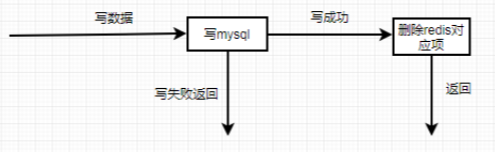
数据读操作流程:
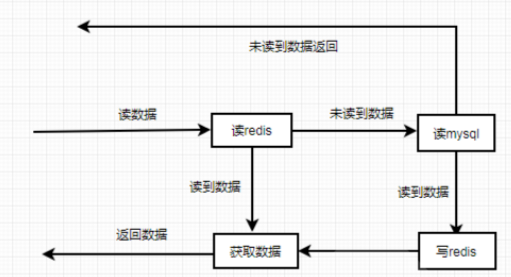
缓存穿透,缓存击穿和缓存雪崩
缓存穿透
缓存穿透是指缓存和数据库中都没有的数据,而用户不断发起请求,比如: 发起为id为 “-1” 的数据或id为特别大不存在的数据。这时的用户很可能是攻击者,攻击会导致数据库压力过大。
解决方法:
- 接口层增加校验,如用户鉴权校验,id做基础校验,id<=0的直接拦截
- 从缓存取不到的数据,在数据库中也没有取到,这时也可以将key-value对写为key-null,缓存有效时间可以设置短点,如30秒(设置太长会导致正常情况也没法使用)。这样可以防止攻击用户反复用同一个id暴力攻击
缓存击穿
缓存击穿是指缓存中没有但数据库中有的数据,比如:热点数据的缓存时间到期后,这时由于并发用户特别多,同时读缓存没读到数据,又同时去数据库去取数据,引起数据库压力瞬间增大,造成过大压力
解决方法:
- 设置热点数据永远不过期。
缓存雪崩
缓存雪崩是指缓存中数据大批量到过期时间,而查询数据量巨大,引起数据库压力过大甚至down机。和缓存击穿不同的是,缓存击穿指并发查同一条数据,缓存雪崩是不同数据都过期了,很多数据都查不到从而查数据库。
解决方法:
- 缓存数据的过期时间设置随机,防止同一时间大量数据过期现象发生
- 如果缓存数据库是分布式部署,将热点数据均匀分布在不同搞得缓存数据库中
- 设置热点数据永远不过期
Pipeline 流水线
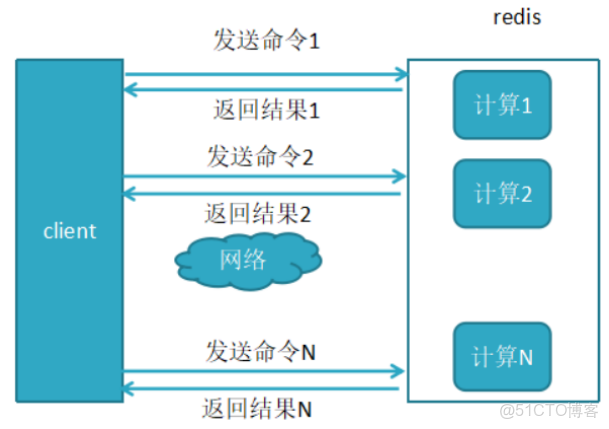
Redis 客户端执行一条命令分4个过程:
发送命令--〉命令排队--〉命令执行--〉返回结果
这个过程称为Round trip time(简称RTT, 往返时间),mget,mset指令可以一次性的批量对多个数据的执行操作,所以有效节约了RTT
但大部分命令(如hgetall)不支持批量操作,需要消耗N次RTT ,利用 Pipeline 技术可以解决这一问题
未使用pipeline执行N条命令如下图
使用了pipeline执行N条命令如下图

两者性能对比
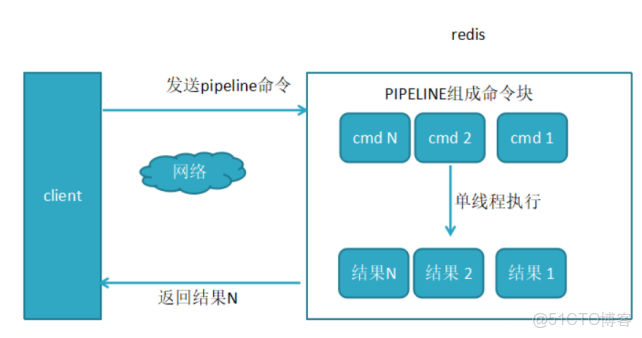
以上对比结果说明在使用Pipeline执行时速度比逐条执行要快,特别是客户端与服务端的网络延迟越大,性能体能越明显。
Redis 安装及连接
官方安装方法说明:
redis.io/docs/getting-started/installation/
包安装 Redis
Ubuntu 安装 Redis
[root@ubuntu2204 ~]#apt list redis
正在列表... 完成
redis/jammy 5:6.0.16-1ubuntu1 all
[root@ubuntu2004 ~]#apt list redis
正在列表... 完成
redis/focal-security,focal-updates 5:5.0.7-2ubuntu0.1 all
N: 还有 1 个版本。请使用 -a 选项来查看它(他们)。
[root@ubuntu2004 ~]#apt -y install redis

[root@ubuntu2004 ~]#pstree -p|grep redis
|-redis-server(1330)-+-{redis-server}(1331)
| 					|-{redis-server}(1332)
| 					`-{redis-server}(1333)

[root@ubuntu2004 ~]#ss -ntll
State Recv-Q Send-Q Local Address:Port Peer Address:Port
Process
LISTEN 0 128 127.0.0.1:6010 0.0.0.0:*
LISTEN 0 511 127.0.0.1:6379 0.0.0.0:*
LISTEN 0 4096 127.0.0.53%lo:53 0.0.0.0:*
LISTEN 0 128 0.0.0.0:22 0.0.0.0:*
LISTEN 0 128 [::1]:6010 [::]:*
LISTEN 0 511 [::1]:6379 [::]:*
LISTEN 0 128 [::]:22 [::]:*
CentOS 安装 Redis
#CentOS 8 由系统源提供
[root@centos8 ~]#dnf info redis
Name : redis
Version : 5.0.3
Release : 1.module_el8.0.0+6+ab019c03
Architecture : x86_64
Size : 927 k
Source : redis-5.0.3-1.module_el8.0.0+6+ab019c03.src.rpm
Repository : AppStream
Summary : A persistent key-value database
URL : http://redis.io
License : BSD and MIT
Description : Redis is an advanced key-value store. It is often referred to as a
data
: structure server since keys can contain strings, hashes, lists,
sets and
: sorted sets.
:
: You can run atomic operations on these types, like appending to a
string;
: incrementing the value in a hash; pushing to a list; computing
set
: intersection, union and difference; or getting the member with
highest
: ranking in a sorted set.
:
: In order to achieve its outstanding performance, Redis works with
an
: in-memory dataset. Depending on your use case, you can persist it
either
: by dumping the dataset to disk every once in a while, or by
appending
: each command to a log.
:
: Redis also supports trivial-to-setup master-slave replication,
with very
: fast non-blocking first synchronization, auto-reconnection on net
split
: and so forth.
:
: Other features include Transactions, Pub/Sub, Lua scripting, Keys
with a
: limited time-to-live, and configuration settings to make Redis
behave like
: a cache.
:
: You can use Redis from most programming languages also.


#在CentOS7系统上需要安装EPEL源
[root@centos7 ~]#yum info redis
Loaded plugins: fastestmirror
Loading mirror speeds from cached hostfile
* base:
Available Packages
Name : redis
Arch : x86_64
Version : 3.2.12
Release : 2.el7
Size : 544 k
Repo : epel/7/x86_64
Summary : A persistent key-value database
URL : http://redis.io
License : BSD
Description : Redis is an advanced key-value store. It is often referred to as a
data
: structure server since keys can contain strings, hashes, lists,
sets and
: sorted sets.
:
: You can run atomic operations on these types, like appending to a
string;
: incrementing the value in a hash; pushing to a list; computing set
: intersection, union and difference; or getting the member with
highest
: ranking in a sorted set.
:
: In order to achieve its outstanding performance, Redis works with
an
: in-memory dataset. Depending on your use case, you can persist it
either
: by dumping the dataset to disk every once in a while, or by
appending
: each command to a log.
:
: Redis also supports trivial-to-setup master-slave replication, with
very
: fast non-blocking first synchronization, auto-reconnection on net
split
: and so forth.
:
: Other features include Transactions, Pub/Sub, Lua scripting, Keys
with a
: limited time-to-live, and configuration settings to make Redis
behave like
: a cache.
:
: You can use Redis from most programming languages also.


[root@centos8 ~]#dnf -y install redis
[root@centos8 ~]#systemctl enable --now redis

[root@centos8 ~]#ss -tnl
State Recv-Q Send-Q Local Address:Port Peer
Address:Port
LISTEN 0 128 0.0.0.0:22
0.0.0.0:*
LISTEN 0 128 127.0.0.1:6379
0.0.0.0:*
LISTEN 0 128 [::]:22
[::]:*

[root@centos8 ~]#pstree -p|grep redis
|-redis-server(3383)-+-{redis-server}(3384)
| 					|-{redis-server}(3385)
| 					`-{redis-server}(3386)

[root@centos8 ~]#redis-cli
127.0.0.1:6379> ping
PONG
127.0.0.1:6379> info
# Server
redis_version:5.0.3
redis_git_sha1:00000000
redis_git_dirty:0
redis_build_id:8c0bf22bfba82c8f
redis_mode:standalone
os:Linux 4.18.0-147.el8.x86_64 x86_64
编译安装 Redis
Redis 源码包官方下载链接:
https://download.redis.io/releases/
编译安装
官方的安装方法:
https://redis.io/docs/getting-started/installation/install-redis-from-source/
范例: 编译安装
#安装依赖包
[root@centos8~]#yum -y install gcc make jemalloc-devel

#如果支持systemd需要安装下面包
[root@ubuntu2204 ~]#apt update & apt -y install make gcc libjemalloc-dev libsystemd-dev
[root@ubuntu2004 ~]#apt update & apt -y install make gcc libjemalloc-dev libsystemd-dev
[root@ubuntu1804 ~]#apt update & apt -y install make gcc libjemalloc-dev libsystemd-dev

[root@centos8 ~]#yum -y install gcc jemalloc-devel systemd-devel
[root@centos7 ~]#yum -y install gcc jemalloc-devel systemd-devel

#下载源码
[root@centos8 ~]#wget http://download.redis.io/releases/redis-6.2.4.tar.gz
[root@centos8 ~]#tar xvf redis-6.2.4.tar.gz

#编译安装
[root@centos8 ~]#cd redis-6.2.4/
[root@centos8 redis-6.2.4]#make -j 2 PREFIX=/apps/redis install #指定redis安装目录
#如果支持systemd,需要执行下面
[root@centos8 redis-6.2.4]#make -j 2 USE_SYSTEMD=yes PREFIX=/apps/redis install

#配置环境变量
[root@centos8 ~]#echo 'PATH=/apps/redis/bin:$PATH' > /etc/profile.d/redis.sh
[root@centos8 ~]#. /etc/profile.d/redis.sh

#目录结构
[root@centos8 ~]#tree /apps/redis/
/apps/redis/
└── bin
    ├── redis-benchmark
    ├── redis-check-aof
    ├── redis-check-rdb
    ├── redis-cli
    ├── redis-sentinel -> redis-server
    └── redis-server

#准备相关目录和配置文件
[root@centos8 ~]#mkdir /apps/redis/{etc,log,data,run} #创建配置文件、日志、数据等目录
[root@centos8 redis-6.2.4]#cp redis.conf /apps/redis/etc/
前台启动 Redis
redis-server 是 redis 服务器端的主程序
[root@centos8 ~]#redis-server --help
Usage: ./redis-server [/path/to/redis.conf] [options]
./redis-server - (read config from stdin)
./redis-server -v or --version
./redis-server -h or --help
./redis-server --test-memory <megabytes>
Examples:
./redis-server (run the server with default conf)
./redis-server /etc/redis/6379.conf
./redis-server --port 7777
./redis-server --port 7777 --slaveof 127.0.0.1 8888
./redis-server /etc/myredis.conf --loglevel verbose
Sentinel mode:
./redis-server /etc/sentinel.conf --sentinel
前台启动 redis
[root@centos8 ~]#redis-server /apps/redis/etc/redis.conf
27569:C 16 Feb 2020 21:18:20.412 # oO0OoO0OoO0Oo Redis is starting oO0OoO0OoO0Oo
27569:C 16 Feb 2020 21:18:20.412 # Redis version=5.0.7, bits=64,
commit=00000000, modified=0, pid=27569, just started
27569:C 16 Feb 2020 21:18:20.412 # Configuration loaded
27569:M 16 Feb 2020 21:18:20.413 * Increased maximum number of open files to
10032 (it was originally set to 1024).
_._
_.-``__ ''-._
_.-`` `. `_. ''-._ Redis 5.0.7 (00000000/0) 64 bit
.-`` .-```. ```\/ _.,_ ''-._
( ' , .-` | `, ) Running in standalone mode
|`-._`-...-` __...-.``-._|'` _.-'| Port: 6379
| `-._ `._ / _.-' | PID: 27569
`-._ `-._ `-./ _.-' _.-'
|`-._`-._ `-.__.-' _.-'_.-'|
| `-._`-._ _.-'_.-' | http://redis.io
`-._ `-._`-.__.-'_.-' _.-'
|`-._`-._ `-.__.-' _.-'_.-'|
| `-._`-._ _.-'_.-' |
`-._ `-._`-.__.-'_.-' _.-'
`-._ `-.__.-' _.-'
`-._ _.-'
`-.__.-'
27569:M 16 Feb 2020 21:18:20.414 # WARNING: The TCP backlog setting of 511
cannot be enforced because /proc/sys/net/core/somaxconn is set to the lower value
of 128.
27569:M 16 Feb 2020 21:18:20.414 # Server initialized
27569:M 16 Feb 2020 21:18:20.414 # WARNING overcommit_memory is set to 0!
Background save may fail under low memory condition. To fix this issue add
'vm.overcommit_memory = 1' to /etc/sysctl.conf and then reboot or run the command
'sysctl vm.overcommit_memory=1' for this to take effect.
27569:M 16 Feb 2020 21:18:20.414 # WARNING you have Transparent Huge Pages (THP)
support enabled in your kernel. This will create latency and memory usage issues
with Redis. To fix this issue run the command 'echo never >
/sys/kernel/mm/transparent_hugepage/enabled' as root, and add it to your
/etc/rc.local in order to retain the setting after a reboot. Redis must be
restarted after THP is disabled.
27569:M 16 Feb 2020 21:18:20.414 * Ready to accept connections

[root@centos8 ~]#ss -ntl
State Recv-Q Send-Q Local Address:Port Peer Address:Port
LISTEN 0 100 127.0.0.1:25
*:*
LISTEN 0 128 127.0.0.1:6379 *:*
范例: 开启 Redis 多实例
[root@centos8 ~]#redis-server --port 6380
[root@centos8 ~]#ss -ntl
State Recv-Q Send-Q Local Address:Port Peer Address:Port
LISTEN 0 511 *:6379 *:*
LISTEN 0 511 *:6380 *:*
LISTEN 0 128 *:22 *:*
LISTEN 0 100 127.0.0.1:25 *:*
LISTEN 0 511 [::]:6380 [::]:*
LISTEN 0 128 [::]:22 [::]:*
LISTEN 0 100 [::1]:25 [::]:*
[root@centos8 ~]#ps -ef|grep redis
redis 4407 1 0 10:56 ? 00:00:01 /apps/redis/bin/redis-server
0.0.0.0:6379
root 4451 963 0 11:05 pts/0 00:00:00 redis-server *:6380
root 4484 4455 0 11:09 pts/1 00:00:00 grep --color=auto redis
[root@centos8 ~]#redis-cli -p 6380
127.0.0.1:6380>
消除启动时的三个Warning提示信息(可选
前面直接启动Redis时有三个Waring信息,可以用下面方法消除告警,但非强制消除
Tcp backlog
WARNING: The TCP backlog setting of 511 cannot be enforced because
/proc/sys/net/core/somaxconn is set to the lower value of 128.
Tcp backlog 是指TCP的第三次握手服务器端收到客户端 ack确认号之后到服务器用Accept函数处理请求前的队列长度,即全连接队列
注意:Ubuntu22.04默认值满足要求,不再有此告警
#默认值
[root@ubuntu2204 ~]#cat /proc/sys/net/core/somaxconn
4096

[root@ubuntu2004 ~]#cat /proc/sys/net/core/somaxconn
4096

[root@rocky8 ~]#cat /proc/sys/net/core/somaxconn
128

#修改配置
#vim /etc/sysctl.conf
net.core.somaxconn = 1024
#sysctl -p
overcommit_memory
WARNING overcommit_memory is set to 0! Background save may fail under low memory
condition. To fix this issue add 'vm.overcommit_memory = 1' to /etc/sysctl.conf
and then reboot or run the command 'sysctl vm.overcommit_memory=1' for this to
take effect.
内核参数说明:
内核参数overcommit_memory 实现内存分配策略,可选值有三个:0、1、2
0 表示内核将检查是否有足够的可用内存供应用进程使用;如果有足够的可用内存,内存申请允许;否则内存申请失败,并把错误返回给应用进程
1 表示内核允许分配所有的物理内存,而不管当前的内存状态如何
2 表示内核允许分配超过所有物理内存和交换空间总和的内存
0是责任1是爱2是舔
范例
#默认值为0
[root@ubuntu2204 ~]#sysctl vm.overcommit_memory
vm.overcommit_memory = 0

[root@ubuntu2004 ~]#sysctl vm.overcommit_memory
vm.overcommit_memory = 0

[root@rocky8 ~]#sysctl vm.overcommit_memory
vm.overcommit_memory = 0

#修改
#vim /etc/sysctl.conf
vm.overcommit_memory = 1 #新版只允许1,不支持2

#sysctl -p
transparent hugepage
WARNING you have Transparent Huge Pages (THP) support enabled in your kernel.
This will create latency and memory usage issues with Redis. To fix this issue
run the command 'echo never > /sys/kernel/mm/transparent_hugepage/enabled' as
root, and add it to your /etc/rc.local in order to retain the setting after a
reboot. Redis must be restarted after THP is disabled.

警告:您在内核中启用了透明大页面(THP,不同于一般4k内存页,而为2M)支持。 这将在Redis中造成延迟
和内存使用问题。 要解决此问题,请以root 用户身份运行命令“echo never>
/sys/kernel/mm/transparent_hugepage/enabled”,并将其添加到您的/etc/rc.local中,以便在
重启后保留设置。禁用THP后,必须重新启动Redis。
注意:Ubuntu22.04默认值满足要求,不再有此告警
范例
#查看默认值
[root@ubuntu2204 ~]#cat /sys/kernel/mm/transparent_hugepage/enabled
always [madvise] never

[root@ubuntu2004 ~]#cat /sys/kernel/mm/transparent_hugepage/enabled
always [madvise] never

[root@rocky8 ~]#cat /sys/kernel/mm/transparent_hugepage/enabled
[always] madvise never

[root@centos7 ~]#cat /sys/kernel/mm/transparent_hugepage/enabled
[always] madvise never

#ubuntu开机配置
[root@ubuntu2004 ~]#cat /etc/rc.local
#!/bin/bash
echo never > /sys/kernel/mm/transparent_hugepage/enabled
[root@ubuntu2004 ~]#chmod +x /etc/rc.local

#CentOS开机配置
[root@centos8 ~]#echo 'echo never > /sys/kernel/mm/transparent_hugepage/enabled' >> /etc/rc.d/rc.local

[root@centos8 ~]#cat /etc/rc.d/rc.local
#!/bin/bash
# THIS FILE IS ADDED FOR COMPATIBILITY PURPOSES
#
# It is highly advisable to create own systemd services or udev rules
# to run scripts during boot instead of using this file.
#
# In contrast to previous versions due to parallel execution during boot
# this script will NOT be run after all other services.
#
# Please note that you must run 'chmod +x /etc/rc.d/rc.local' to ensure
# that this script will be executed during boot.
touch /var/lock/subsys/local
echo never > /sys/kernel/mm/transparent_hugepage/enabled
[root@centos8 ~]#chmod +x /etc/rc.d/rc.local
验证是否消除 Warning
重新启动redis 服务不再有前面的三个Waring信息
[root@centos8 ~]#redis-server /apps/redis/etc/redis.conf
27646:C 16 Feb 2020 21:26:52.690 # oO0OoO0OoO0Oo Redis is starting oO0OoO0OoO0Oo
27646:C 16 Feb 2020 21:26:52.690 # Redis version=5.0.7, bits=64,
commit=00000000, modified=0, pid=27646, just started
27646:C 16 Feb 2020 21:26:52.690 # Configuration loaded
27646:M 16 Feb 2020 21:26:52.690 * Increased maximum number of open files to
10032 (it was originally set to 1024).
_._
_.-``__ ''-._
_.-`` `. `_. ''-._ Redis 5.0.7 (00000000/0) 64 bit
.-`` .-```. ```\/ _.,_ ''-._
( ' , .-` | `, ) Running in standalone mode
|`-._`-...-` __...-.``-._|'` _.-'| Port: 6379
| `-._ `._ / _.-' | PID: 27646
`-._ `-._ `-./ _.-' _.-'
|`-._`-._ `-.__.-' _.-'_.-'|
| `-._`-._ _.-'_.-' | http://redis.io
`-._ `-._`-.__.-'_.-' _.-'
|`-._`-._ `-.__.-' _.-'_.-'|
| `-._`-._ _.-'_.-' |
`-._ `-._`-.__.-'_.-' _.-'
`-._ `-.__.-' _.-'
`-._ _.-'
`-.__.-'
27646:M 16 Feb 2020 21:26:52.691 # Server initialized
27646:M 16 Feb 2020 21:26:52.692 * DB loaded from disk: 0.000 seconds
27646:M 16 Feb 2020 21:26:52.692 * Ready to accept connections
创建 Redis 用户和设置数据目录权限
[root@centos8 ~]#useradd -r -s /sbin/nologin redis

#设置目录权限
[root@centos8 ~]#chown -R redis.redis /apps/redis/
创建 Redis 服务 Service 文件
#可以复制CentOS8利用yum安装Redis生成的redis.service文件,进行修改
[root@centos8 ~]#scp 10.0.0.8:/lib/systemd/system/redis.service /lib/systemd/system/

[root@centos8 ~]#cp redis-stable/utils/systemd-redis_server.service /lib/systemd/system/redis.service

[root@centos8 ~]#vim /lib/systemd/system/redis.service
[root@centos8 ~]#cat /lib/systemd/system/redis.service

[Unit]
Description=Redis persistent key-value database
After=network.target

[Service]
ExecStart=/apps/redis/bin/redis-server /apps/redis/etc/redis.conf --supervised systemd
ExecStop=/bin/kill -s QUIT $MAINPID
Type=notify #如果支持systemd可以启用此行
User=redis
Group=redis
RuntimeDirectory=redis
RuntimeDirectoryMode=0755
LimitNOFILE=1000000 #指定此值才支持更大的maxclients值

[Install]
WantedBy=multi-user.target
Redis 通过Service方式启动
[root@centos8 ~]#systemctl daemon-reload
[root@centos8 ~]#systemctl start redis
[root@centos8 ~]#systemctl status redis
● redis.service - Redis persistent key-value database
Loaded: loaded (/usr/lib/systemd/system/redis.service; enabled; vendor preset:
disabled)
Active: active (running) since Sun 2020-02-16 23:08:08 CST; 2s ago
Process: 1667 ExecStop=/bin/kill -s QUIT $MAINPID (code=exited,
status=0/SUCCESS)
Main PID: 1669 (redis-server)
CGroup: /system.slice/redis.service
└─1669 /apps/redis/bin/redis-server 127.0.0.1:6379
Feb 16 23:08:08 centos8.wangxiaochun.com redis-server[1669]: |`-._`-._
`-.__.-' _.-'_.-'|
Feb 16 23:08:08 centos8.wangxiaochun.com redis-server[1669]: | `-._`-._
_.-'_.-' |
Feb 16 23:08:08 centos8.wangxiaochun.com redis-server[1669]: `-._ `-._`-.__.-
'_.-' _.-'
Feb 16 23:08:08 centos8.wangxiaochun.com redis-server[1669]: `-._ `-.__.-'
_.-'
Feb 16 23:08:08 centos8.wangxiaochun.com redis-server[1669]: `-._ _.-'
Feb 16 23:08:08 centos8.wangxiaochun.com redis-server[1669]: `-.__.-'
Feb 16 23:08:08 centos8.wangxiaochun.com redis-server[1669]: 1669:M 16 Feb 2020
23:08:08.931 # Server ini...ed
Feb 16 23:08:08 centos8.wangxiaochun.com redis-server[1669]: 1669:M 16 Feb 2020
23:08:08.931 * DB loaded ...ds
Feb 16 23:08:08 centos8.wangxiaochun.com redis-server[1669]: 1669:M 16 Feb 2020
23:08:08.931 * Ready to a...ns
Feb 16 23:08:08 centos7.wangxiaochun.com systemd[1]: Started Redis persistent
key-value database.
Hint: Some lines were ellipsized, use -l to show in full.
[root@centos8 ~]#ss -ntl
State Recv-Q Send-Q Local Address:Port Peer Address:Port
LISTEN 0 100 127.0.0.1:25 *:*
LISTEN 0 511 127.0.0.1:6379 *:*
LISTEN 0 128 *:22 *:*
LISTEN 0 100 [::1]:25 [::]:*
LISTEN 0 128 [::]:22 [::]:*
验证客户端连接 Redis
[root@centos8 ~]#/apps/redis/bin/redis-cli -h IP/HOSTNAME -p PORT -a PASSWORD
范例:
[root@centos8 ~]#redis-cli
127.0.0.1:6379> ping
PONG
127.0.0.1:6379> info
# Server
redis_version:5.0.7
redis_git_sha1:00000000
redis_git_dirty:0
redis_build_id:673d8c0ee1a8872
redis_mode:standalone
os:Linux 3.10.0-1062.el7.x86_64 x86_64
arch_bits:64
multiplexing_api:epoll
atomicvar_api:atomic-builtin
gcc_version:4.8.5
process_id:1669
run_id:5e0420e92e35ad1d740e9431bc655bfd0044a5d1
tcp_port:6379
uptime_in_seconds:140
uptime_in_days:0
hz:10
configured_hz:10
lru_clock:4807524
executable:/apps/redis/bin/redis-server
config_file:/apps/redis/etc/redis.conf
# Clients
connected_clients:1
client_recent_max_input_buffer:2
client_recent_max_output_buffer:0
blocked_clients:0
# Memory
used_memory:575792
used_memory_human:562.30K
used_memory_rss:3506176
used_memory_rss_human:3.34M
used_memory_peak:575792
used_memory_peak_human:562.30K
used_memory_peak_perc:100.18%
used_memory_overhead:562590
used_memory_startup:512896
used_memory_dataset:13202
used_memory_dataset_perc:20.99%
allocator_allocated:1201392
allocator_active:1531904
allocator_resident:8310784
total_system_memory:1019645952
total_system_memory_human:972.41M
used_memory_lua:37888
used_memory_lua_human:37.00K
used_memory_scripts:0
used_memory_scripts_human:0B
number_of_cached_scripts:0
maxmemory:0
maxmemory_human:0B
maxmemory_policy:noeviction
allocator_frag_ratio:1.28
allocator_frag_bytes:330512
allocator_rss_ratio:5.43
allocator_rss_bytes:6778880
rss_overhead_ratio:0.42
rss_overhead_bytes:-4804608
mem_fragmentation_ratio:6.57
mem_fragmentation_bytes:2972384
mem_not_counted_for_evict:0
mem_replication_backlog:0
mem_clients_slaves:0
mem_clients_normal:49694
mem_aof_buffer:0
mem_allocator:jemalloc-5.1.0
active_defrag_running:0
lazyfree_pending_objects:0
# Persistence
loading:0
rdb_changes_since_last_save:0
rdb_bgsave_in_progress:0
rdb_last_save_time:1581865688
rdb_last_bgsave_status:ok
rdb_last_bgsave_time_sec:-1
rdb_current_bgsave_time_sec:-1
rdb_last_cow_size:0
aof_enabled:0
aof_rewrite_in_progress:0
aof_rewrite_scheduled:0
aof_last_rewrite_time_sec:-1
aof_current_rewrite_time_sec:-1
aof_last_bgrewrite_status:ok
aof_last_write_status:ok
aof_last_cow_size:0
# Stats
total_connections_received:1
total_commands_processed:2
instantaneous_ops_per_sec:0
total_net_input_bytes:45
total_net_output_bytes:11475
instantaneous_input_kbps:0.00
instantaneous_output_kbps:0.00
rejected_connections:0
sync_full:0
sync_partial_ok:0
sync_partial_err:0
expired_keys:0
expired_stale_perc:0.00
expired_time_cap_reached_count:0
evicted_keys:0
keyspace_hits:0
keyspace_misses:0
pubsub_channels:0
pubsub_patterns:0
latest_fork_usec:0
migrate_cached_sockets:0
slave_expires_tracked_keys:0
active_defrag_hits:0
active_defrag_misses:0
active_defrag_key_hits:0
active_defrag_key_misses:0
# Replication
role:master
connected_slaves:0
master_replid:f7228f0b6203183004fae8db00568f9f73422dc4
master_replid2:0000000000000000000000000000000000000000
master_repl_offset:0
second_repl_offset:-1
repl_backlog_active:0
repl_backlog_size:1048576
repl_backlog_first_byte_offset:0
repl_backlog_histlen:0
# CPU
used_cpu_sys:0.132821
used_cpu_user:0.124317
used_cpu_sys_children:0.000000
used_cpu_user_children:0.000000
# Cluster
cluster_enabled:0
# Keyspace
127.0.0.1:6379> exit
[root@centos7 ~]#
实战案例:一键编译安装Redis脚本
[root@ubuntu2004 ~]#cat install_redis.sh
#!/bin/bash
REDIS_VERSION=redis-6.2.5
PASSWORD=123456
INSTALL_DIR=/apps/redis
CPUS=`lscpu |awk '/^CPU\(s\)/{print $2}'`

. /etc/os-release

color () {
    RES_COL=60
    MOVE_TO_COL="echo -en \\033[${RES_COL}G"
    SETCOLOR_SUCCESS="echo -en \\033[1;32m"
    SETCOLOR_FAILURE="echo -en \\033[1;31m"
    SETCOLOR_WARNING="echo -en \\033[1;33m"
    SETCOLOR_NORMAL="echo -en \E[0m"
    echo -n "$1" && $MOVE_TO_COL
    echo -n "["
    if [ $2 = "success" -o $2 = "0" ] ;then
    	${SETCOLOR_SUCCESS}
    	echo -n $" OK "
    elif [ $2 = "failure" -o $2 = "1" ] ;then
    	${SETCOLOR_FAILURE}
    	echo -n $"FAILED"
    else
    	${SETCOLOR_WARNING}
    	echo -n $"WARNING"
    fi
    ${SETCOLOR_NORMAL}
    echo -n "]"
    echo

}

prepare(){
    if [ $ID = "centos" ];then
    	yum -y install gcc make jemalloc-devel systemd-devel
    else
    	apt update
    	apt -y install gcc make libjemalloc-dev libsystemd-dev
    fi
    if [ $? -eq 0 ];then
    	color "安装软件包成功" 0
    else
    	color "安装软件包失败,请检查网络配置" 1
    exit
    fi
}

install() {
    if [ ! -f ${REDIS_VERSION}.tar.gz ];then
    	wget http://download.redis.io/releases/${REDIS_VERSION}.tar.gz || { color "Redis 源码下载失败" 1 ; exit; }
    fi

    tar xf ${REDIS_VERSION}.tar.gz
    cd ${REDIS_VERSION}
    make -j $CUPS USE_SYSTEMD=yes PREFIX=${INSTALL_DIR} install && color "Redis编译安装完成" 0 || { color "Redis 编译安装失败" 1 ;exit ; }
    ln -s ${INSTALL_DIR}/bin/redis-* /usr/bin/
    mkdir -p ${INSTALL_DIR}/{etc,log,data,run}
    cp redis.conf ${INSTALL_DIR}/etc/

    sed -i -e 's/bind 127.0.0.1/bind 0.0.0.0/' -e "/# requirepass/a requirepass $PASSWORD" -e "/^dir .*/c dir ${INSTALL_DIR}/data/" -e "/logfile .*/c logfile ${INSTALL_DIR}/log/redis-6379.log" -e "/^pidfile .*/c pidfile ${INSTALL_DIR}/run/redis_6379.pid" ${INSTALL_DIR}/etc/redis.conf

    if id redis &> /dev/null ;then
		color "Redis 用户已存在" 1
	else
		useradd -r -s /sbin/nologin redis
		color "Redis 用户创建成功" 0
	fi

	chown -R redis.redis ${INSTALL_DIR}

	cat >> /etc/sysctl.conf <<EOF
net.core.somaxconn = 1024
vm.overcommit_memory = 1
EOF

	sysctl -p
	if [ $ID = "centos" ];then
		echo 'echo never > /sys/kernel/mm/transparent_hugepage/enabled' >> /etc/rc.d/rc.local
		chmod +x /etc/rc.d/rc.local
		/etc/rc.d/rc.local
	else
		echo -e '#!/bin/bash\necho never > /sys/kernel/mm/transparent_hugepage/enabled' >> /etc/rc.local
		chmod +x /etc/rc.local
		/etc/rc.local
	fi

cat > /lib/systemd/system/redis.service <<EOF
[Unit]
Description=Redis persistent key-value database
After=network.target

[Service]
ExecStart=${INSTALL_DIR}/bin/redis-server ${INSTALL_DIR}/etc/redis.conf --
supervised systemd
ExecStop=/bin/kill -s QUIT \$MAINPID
Type=notify
User=redis
Group=redis
RuntimeDirectory=redis
RuntimeDirectoryMode=0755
LimitNOFILE=1000000

[Install]
WantedBy=multi-user.target

EOF

	systemctl daemon-reload
	systemctl enable --now redis &> /dev/null
	if [ $? -eq 0 ];then
		color "Redis 服务启动成功,Redis信息如下:" 0
	else
		color "Redis 启动失败" 1
		exit
	fi
	sleep 2
	redis-cli -a $PASSWORD INFO Server 2> /dev/null
}

prepare
install
Redis 的多实例
测试环境中经常使用多实例,需要指定不同实例的相应的端口,配置文件,日志文件等相关配置
范例: 以编译安装为例实现 redis 多实例
#生成的文件列表
[root@centos8 ~]#ll /apps/redis/
total 0
drwxr-xr-x 2 redis redis 134 Oct 15 22:13 bin
drwxr-xr-x 2 redis redis 69 Oct 15 23:25 data
drwxr-xr-x 2 redis redis 75 Oct 15 22:42 etc
drwxr-xr-x 2 redis redis 72 Oct 15 23:25 log
drwxr-xr-x 2 redis redis 72 Oct 15 22:47 run

[root@centos8 ~]#tree /apps/redis/
/apps/redis/
├── bin
│ ├── redis-benchmark
│ ├── redis-check-aof
│ ├── redis-check-rdb
│ ├── redis-cli
│ ├── redis-sentinel -> redis-server
│ └── redis-server
├── data
│ ├── dump_6379.rdb
│ ├── dump_6380.rdb
│ └── dump_6381.rdb
├── etc
│ ├── redis_6379.conf
│ ├── redis_6380.conf
│ └── redis_6381.conf
├── log
│ ├── redis_6379.log
│ ├── redis_6380.log
│ └── redis_6381.log
└── run
├── redis_6379.pid
├── redis_6380.pid
└── redis_6381.pid

#编辑配置文件
[root@centos8 ~]#vim /apps/redis/etc/redis6379.conf
[root@centos8 ~]#grep 6379 /apps/redis/etc/redis6379.conf
# Accept connections on the specified port, default is 6379 (IANA #815344).
port 6379
# tls-port 6379
pidfile /apps/redis/run/redis_6379.pid
logfile "/apps/redis/log/redis_6379.log"
dbfilename dump_6379.rdb
# cluster-config-file nodes-6379.conf
# cluster-announce-tls-port 6379

[root@centos8 ~]#sed 's/6379/6380/' /apps/redis/etc/redis6379.conf > /apps/redis/etc/redis6380.conf

[root@centos8 ~]#sed 's/6379/6381/' /apps/redis/etc/redis6379.conf > /apps/redis/etc/redis6381.conf

[root@centos8 ~]#grep '^[^#]' /apps/redis/etc/redis_6379.conf
bind 0.0.0.0
protected-mode yes
port 6379
tcp-backlog 511
timeout 0
tcp-keepalive 300
daemonize yes
supervised no
pidfile /apps/redis/run/redis_6379.pid
loglevel notice
logfile "/apps/redis/log/redis_6379.log"
databases 16
always-show-logo yes
save 900 1
save 300 10
save 60 10000
stop-writes-on-bgsave-error yes
rdbcompression yes
rdbchecksum yes
dbfilename dump_6379.rdb
dir /apps/redis/data/
replica-serve-stale-data yes
replica-read-only yes
repl-diskless-sync no
repl-diskless-sync-delay 5
repl-disable-tcp-nodelay no
replica-priority 100
lazyfree-lazy-eviction no
lazyfree-lazy-expire no
lazyfree-lazy-server-del no
replica-lazy-flush no
appendonly no
appendfilename "appendonly_6379.aof"
appendfsync everysec
no-appendfsync-on-rewrite no
auto-aof-rewrite-percentage 100
auto-aof-rewrite-min-size 64mb
aof-load-truncated yes
aof-use-rdb-preamble yes
lua-time-limit 5000
slowlog-log-slower-than 10000
slowlog-max-len 128
latency-monitor-threshold 0
notify-keyspace-events ""
hash-max-ziplist-entries 512
hash-max-ziplist-value 64
list-max-ziplist-size -2
list-compress-depth 0
set-max-intset-entries 512
zset-max-ziplist-entries 128
zset-max-ziplist-value 64
hll-sparse-max-bytes 3000
stream-node-max-bytes 4096
stream-node-max-entries 100
activerehashing yes
client-output-buffer-limit normal 0 0 0
client-output-buffer-limit replica 256mb 64mb 60
client-output-buffer-limit pubsub 32mb 8mb 60
hz 10
dynamic-hz yes
aof-rewrite-incremental-fsync yes
rdb-save-incremental-fsync yes

[root@centos8 ~]#grep 6380 /apps/redis/etc/redis_6380.conf
# Accept connections on the specified port, default is 6380 (IANA #815344).
port 6380
pidfile /apps/redis/run/redis_6380.pid
logfile "/apps/redis/log/redis_6380.log"
dbfilename dump_6380.rdb
appendfilename "appendonly_6380.aof"
# cluster-config-file nodes-6380.conf
# cluster-announce-port 6380
# cluster-announce-bus-port 6380
[root@centos7 ~]#grep 6381 /apps/redis/etc/redis_6381.conf
# Accept connections on the specified port, default is 6381 (IANA #815344).
port 6381
pidfile /apps/redis/run/redis_6381.pid
logfile "/apps/redis/log/redis_6381.log"
dbfilename dump_6381.rdb
appendfilename "appendonly_6381.aof"
# cluster-config-file nodes-6381.conf
# cluster-announce-port 6381

[root@centos8 ~]#cat /lib/systemd/system/redis6379.service
[Unit]
Description=Redis persistent key-value database
After=network.target
[Service]
ExecStart=/apps/redis/bin/redis-server /apps/redis/etc/redis_6379.conf --
supervised systemd
#ExecStop=/usr/libexec/redis-shutdown
ExecStop=/bin/kill -s QUIT $MAINPID
Type=notify
User=redis
Group=redis
RuntimeDirectory=redis
RuntimeDirectoryMode=0755
[Install]
WantedBy=multi-user.target

[root@centos8 ~]#cat /lib/systemd/system/redis6380.service
[Unit]
Description=Redis persistent key-value database
After=network.target
[Service]
ExecStart=/apps/redis/bin/redis-server /apps/redis/etc/redis_6380.conf --
supervised systemd
#ExecStop=/usr/libexec/redis-shutdown
ExecStop=/bin/kill -s QUIT $MAINPID
Type=notify
User=redis
Group=redis
RuntimeDirectory=redis
RuntimeDirectoryMode=0755
[Install]
WantedBy=multi-user.target
[root@centos8 ~]#cat /lib/systemd/system/redis6381.service
[Unit]
Description=Redis persistent key-value database
After=network.target

[Service]
ExecStart=/apps/redis/bin/redis-server /apps/redis/etc/redis_6381.conf --
supervised systemd
#ExecStop=/usr/libexec/redis-shutdown
ExecStop=/bin/kill -s QUIT $MAINPID
Type=notify
User=redis
Group=redis
RuntimeDirectory=redis
RuntimeDirectoryMode=0755
[Install]
WantedBy=multi-user.target

[root@centos8 ~]#systemctl daemon-reload
[root@centos8 ~]#systemctl enable --now redis6379 redis6380 redis6381
[root@centos8 ~]#ss -ntl
State Recv-Q Send-Q Local Address:Port Peer Address:Port
LISTEN 0 128 *:22 *:*
LISTEN 0 100 127.0.0.1:25 *:*
LISTEN 0 511 *:6379 *:*
LISTEN 0 511 *:6380 *:*
LISTEN 0 511 *:6381 *:*
LISTEN 0 128 [::]:22 [::]:*
LISTEN 0 100 [::1]:25 [::]:*
Redis 相关工具和客户端连接
安装的相关程序介绍
#Redis7.0以上
[root@ubuntu2204 ~]#ll /apps/redis/bin/
total 32772
-rwxr-xr-x 1 root root 4366792 Feb 16 21:12 redis-benchmark #性能测试程序
-rwxr-xr-x 1 root root 8125184 Feb 16 21:12 redis-check-aof -> redis-server #AOF文件检查程序
-rwxr-xr-x 1 root root 8125184 Feb 16 21:12 redis-check-rdb -> redis-server #RDB文件检查程序
-rwxr-xr-x 1 root root 4807856 Feb 16 21:12 redis-cli #客户端程序
lrwxrwxrwx 1 root root 12 Feb 16 21:12 redis-sentinel -> redis-server #哨兵程序,软连接到服务器端主程序
-rwxr-xr-x 1 root root 8125184 Feb 16 21:12 redis-server #服务端主程序
#Redis6.0以下
[root@centos8 ~]#ll /apps/redis/bin/
total 32772
-rwxr-xr-x 1 root root 4366792 Feb 16 21:12 redis-benchmark #性能测试程序
-rwxr-xr-x 1 root root 8125184 Feb 16 21:12 redis-check-aof #AOF文件检查程序
-rwxr-xr-x 1 root root 8125184 Feb 16 21:12 redis-check-rdb #RDB文件检查程序
-rwxr-xr-x 1 root root 4807856 Feb 16 21:12 redis-cli #客户端程序
lrwxrwxrwx 1 root root 12 Feb 16 21:12 redis-sentinel -> redis-server #哨兵程序,软连接到服务器端主程序
-rwxr-xr-x 1 root root 8125184 Feb 16 21:12 redis-server #服务端主程序
客户端程序 redis-cli
#默认为本机无密码连接
redis-cli
#远程客户端连接,注意:Redis没有用户的概念
redis-cli -h <Redis服务器IP> -p <PORT> -a <PASSWORD> --no-auth-warning
程序连接 Redis
Redis 支持多种开发语言访问
https://redis.io/clients
Shell 脚本访问 Redis
[root@centos8 ~]#cat redis_test.sh
#!/bin/bash
NUM=100
PASS=123456
for i in `seq $NUM`;do
    redis-cli -h 127.0.0.1 -a "$PASS" --no-auth-warning set key${i} value${i}
    echo "key${i} value${i} 写入完成"
done
echo "$NUM个key写入完成"
Python 程序连接 Redis
python 提供了多种开发库,都可以支持连接访问 Redis
下面选择使用redis-py 库连接 Redis
https://github.com/andymccurdy/redis-py
范例:
#Ubuntu安装
[root@ubuntu2204 ~]#apt update && apt -y install python3-redis
[root@ubuntu2004 ~]#apt update && apt -y install python3-redis

#CentOS安装
[root@centos8 ~]#yum info python3-redis
[root@centos8 ~]#yum -y install python3 python3-redis

#注意文件名不要为redis,会和redis模块名称冲突
[root@centos8 ~]#cat redis_test.py
#!/usr/bin/python3
import redis

pool = redis.ConnectionPool(host="127.0.0.1",port=6379,password="123456",decode_responses=True)
c = redis.Redis(connection_pool=pool)
for i in range(100):
    c.set("k%d" % i,"v%d" % i)
    data=c.get("k%d" % i)
    print(data)

[root@centos8 ~]# python3 redis_test.py
......
'v94'
'v95'
'v96'
'v97'
'v98'
'v99'
[root@centos8 ~]#redis-cli
127.0.0.1:6379> get k10
"v10"
127.0.0.1:6379>

#注意:新版redis禁用了RDB,会导致上面脚本执行过程中失败,可以启用RDB解决
[root@ubuntu2204 ~]#vi /apps/redis/etc/redis.conf
#修改下面行的注释
dir /apps/redis/etc/redis.conf
[root@ubuntu2204 ~]#systemctl restart redis
Golang 程序连接 Redis
#准备Golang代码,注意:文件名为main.go
[root@ubuntu2204 redis-go]#cat main.go
package main

import (
    "context"
    "fmt"
    "github.com/redis/go-redis/v9"
)
var ctx = context.Background()

func main() {
	rdb := redis.NewClient(&redis.Options{
        Addr: "127.0.0.1:6379",
        Password: "123456",
		DB: 0,
	})
    _, err := rdb.Ping(ctx).Result()
    if err != nil {
        fmt.Printf("连接redis出错,错误信息:%v", err)
        return
    }
    for i:=1;i<=10000;i++ {
        key := fmt.Sprintf("key%d", i)
        value := fmt.Sprintf("value%d", i)
        err = rdb.Set(ctx, key, value,0).Err()
        if err != nil {
        panic(err)
    }

    keys, err := rdb.Keys(ctx, key).Result()
    if err != nil {
    	panic(err)
    }
    fmt.Println(keys)
    }
}

[root@ubuntu2204 redis-go]#apt update && apt -y install golang
[root@ubuntu2204 redis-go]#go mod init redis-go
[root@ubuntu2204 redis-go]#go env -w GOPROXY=https://goproxy.cn,direct
[root@ubuntu2204 redis-go]#go get github.com/redis/go-redis/v9

[root@ubuntu2204 redis-go]#cat go.mod
module redis-go
go 1.18
require (
    github.com/cespare/xxhash/v2 v2.2.0 // indirect
    github.com/dgryski/go-rendezvous v0.0.0-20200823014737-9f7001d12a5f //
indirect
	github.com/redis/go-redis/v9 v9.0.3 // indirect
)

[root@ubuntu2204 redis-go]#cat go.sum
github.com/cespare/xxhash/v2 v2.2.0
h1:DC2CZ1Ep5Y4k3ZQ899DldepgrayRUGE6BBZ/cd9Cj44=
github.com/cespare/xxhash/v2 v2.2.0/go.mod
h1:VGX0DQ3Q6kWi7AoAeZDth3/j3BFtOZR5XLFGgcrjCOs=
github.com/dgryski/go-rendezvous v0.0.0-20200823014737-9f7001d12a5f
h1:lO4WD4F/rVNCu3HqELle0jiPLLBs70cWOduZpkS1E78=
github.com/dgryski/go-rendezvous v0.0.0-20200823014737-9f7001d12a5f/go.mod
h1:cuUVRXasLTGF7a8hSLbxyZXjz+1KgoB3wDUb6vlszIc=
github.com/redis/go-redis/v9 v9.0.3
h1:+7mmR26M0IvyLxGZUHxu4GiBkJkVDid0Un+j4ScYu4k=
github.com/redis/go-redis/v9 v9.0.3/go.mod
h1:WqMKv5vnQbRuZstUwxQI195wHy+t4PuXDOjzMvcuQHk=

#静态编译并指定生成的文件名myredi
[root@ubuntu2204 redis-go]#CGO_ENABLED=0 go build -o myredis
[root@ubuntu2204 redis-go]#ls
go.mod go.sum main.go myredis
[root@ubuntu2204 redis-go]#ldd myredis
不是动态可执行文件

#或者动态编译文件名为redis-go
[root@ubuntu2204 redis-go]#go build
[root@ubuntu2204 redis-go]#ls
go.mod go.sum main.go redis-go
[root@ubuntu2204 redis-go]#ldd redis-go
linux-vdso.so.1 (0x00007fff5b15e000)
libc.so.6 => /lib/x86_64-linux-gnu/libc.so.6 (0x00007f4fc1c18000)
/lib64/ld-linux-x86-64.so.2 (0x00007f4fc1e48000)

#运行
[root@ubuntu2204 redis-go]#./redis-go
图形工具
有一些第三方开发的图形工具也可以连接redis, 比如: RedisDesktopManager
Docker 容器方式部署
#实现Redis的持久化保存
[root@ubuntu2204 ~]#docker run --name redis -p 6379:6379 -d -v /data/redis:/data redis
[root@ubuntu2204 ~]#docker exec redis redis-cli info server
# Server
redis_version:7.0.7
redis_git_sha1:00000000
redis_git_dirty:0
redis_build_id:73d41e29cd700caa
redis_mode:standalone
os:Linux 5.15.0-52-generic x86_64
arch_bits:64
monotonic_clock:POSIX clock_gettime
multiplexing_api:epoll
atomicvar_api:c11-builtin
gcc_version:10.2.1
process_id:1
process_supervised:no
run_id:fb61da13dd55eb361305a36438803b2883e2909b
tcp_port:6379
server_time_usec:1673849373675378
uptime_in_seconds:267
uptime_in_days:0
hz:10
configured_hz:10
lru_clock:12904989
executable:/data/redis-server
config_file:
io_threads_active:0

[root@ubuntu2204 ~]#docker exec redis redis-cli set name wang
[root@ubuntu2204 ~]#docker exec redis redis-cli set age 18
OK
[root@ubuntu2204 ~]#docker exec redis redis-cli get name
wang
[root@ubuntu2204 ~]#docker exec redis redis-cli get age
18
[root@ubuntu2204 ~]#docker exec redis redis-cli save
OK
[root@ubuntu2204 ~]#ls /data/redis/ -l
总用量 4
-rw------- 1 lxd 999 111 1月 16 14:07 dump.rdb
#默认Redis容器可以直接远程连接
[root@ubuntu2204 ~]#redis-cli -h 10.0.0.202
10.0.0.202:6379> keys *
1) "age"
2) "name"
10.0.0.202:6379> exit